


 New
New


 Play QuickTime version
  Play Flash version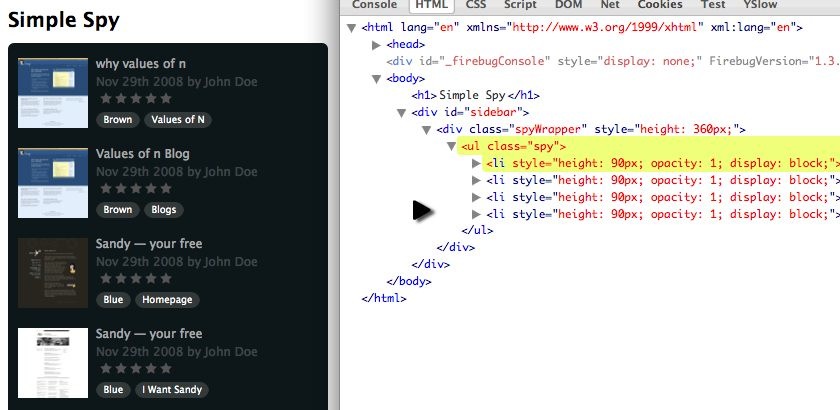
Watch
Watch the jQuery spy screencast (alternative flash version)
QuickTime version is approximately 60Mb, flash version is streaming.
View the demo and source code used in the jQuery spy screencast
Simple Spy
The great thing about Realmac’s QuickSnapper site is that if JavaScript is turned off, the list of snaps is visible by default. So we’ll follow suit.
It’s also worth noting that their version only keep pulling in new items until it hits the end. I’ll show you how you can keep the list looping, and in a follow up tutorial I’ll show you how to hook this in to an Ajax hit that doesn’t hammer your server and keeps the effect nice and smooth.
Development Tasks
I’ve broken down what needs to happen to be able to recreate this effect:
Setup
- Capture a copy/cache of
lielements (for running the effect). - Limit the
ulto only show Nlielements.
Running the Effect
- Insert a new item at the top that is: opacity: 0 & height: 0.
- Fade the last item out.
- Increase first item’s height to real height.
- …at the same time, decrease the height of the last item.
- Once height changes have finished, remove the last item.
- Repeat.
HTML
The HTML is very simple for the effect – since the non-JS version of the page the HTML appears the same, except with a longer list.
As such, rather than the complete listing, which you can see in the live demo, we’re just using a simple list element:
<ul class="spy">
    <li>
      <!-- contents of list item -->
    </li>
</ul>
jQuery
For this example of code, we’re creating a reusable plugin. So I’ve wrapped our code in the follow pattern:
(function ($) {

// our plugin goes here

})(jQuery)
This allows me to reference the $ variable knowing that it won’t conflict with other libraries such as Prototype – because we’ve passed the jQuery variable in to the function in the following line:
})(jQuery)Version 1: simultaneously height animate
This is the first version of the plugin. It resizes the first and last item simultaneously:
(function ($) {
$.fn.simpleSpy = function (limit, interval) {
  // set some defaults
  limit = limit || 4;
  interval = interval || 4000;

  return this.each(function () {
    // 1. setup
      // capture a cache of all the list items
    var $list = $(this),
      items = [], // uninitialised
      currentItem = limit,
      total = 0, // initialise later on
      height = $list.find('> li:first').height();

    // capture the cache
    $list.find('> li').each(function () {
      items.push('<li>' + $(this).html() + '</li>');
    });

    total = items.length;

    // chomp the list down to limit li elements
    $list.find('> li').filter(':gt(' + (limit - 1) + ')').remove();

    // 2. effect
    function spy() {
      // insert a new item with opacity and height of zero
      var $insert = $(items[currentItem]).css({
        height : 0,
        opacity : 0,
        display : 'none'
      }).prependTo($list);

      // fade the LAST item out
      $list.find('> li:last').animate({ opacity : 0}, 1000, function () {
        // increase the height of the NEW first item
        $insert.animate({ height : height }, 1000).animate({ opacity : 1 }, 1000);

        // AND at the same time - decrease the height of the LAST item
        $(this).animate({ height : 0 }, 1000, function () {
            // finally fade the first item in (and we can remove the last)
            $(this).remove();
        });
      });

      currentItem++;
      if (currentItem >= total) {
        currentItem = 0;
      }

      // trigger the effect again in 4 seconds
      setTimeout(spy, interval);
    }

    spy();
  });
};
})(jQuery);
Version 2: fixed height
The second version has the following changes, and allows us to remove one of the animations, reducing the work the browser has to do.
We do this by created a fixed height wrapper around the ul.spy, and it works because the styling is on an outer div.
We change:
// chomp the list down to limit li elements
$list.find('> li').filter(':gt(' + (limit - 1) + ')').remove();
To add a line before that wraps our spy:
$list.wrap('<div class="spyWrapper" />').parent().css({ height : height * limit });

// chomp the list down to limit li elements
$list.find('> li').filter(':gt(' + (limit - 1) + ')').remove();
Then we need to comment out the animate height to zero.
We change:
// AND at the same time - decrease the height of the LAST item
$(this).animate({ height : 0 }, 1000, function () {
    // finally fade the first item in (and we can remove the last)
    $(this).remove();
});
To only remove the element:
// finally fade the first item in (and we can remove the last)
$(this).remove();
Version 3: loop once
Though I didn’t cover this in the screencast, it’s simple to change the spy to run once, by changing the following:
if (currentItem >= total) {
  currentItem = 0;
}

// trigger the effect again in 4 seconds
setTimeout(spy, interval)
To, if we’ve hit the limit, then don’t set a new timeout:
if (currentItem >= total) {
  // let the spy finish
} else {
  // trigger the effect again in 4 seconds
  setTimeout(spy, interval);
}
You should follow me on Twitter here I tweet about jQuery amongst the usual tweet-splurges!