Simple jQuery Spy Effect

2Dec

A few years ago Digg released a very cool little visualisation tool they dubbed the Digg Spy (it's since been upgraded to the Big Spy). Recently Realmac Software released the site QuickSnapper to accompany LittleSnapper.

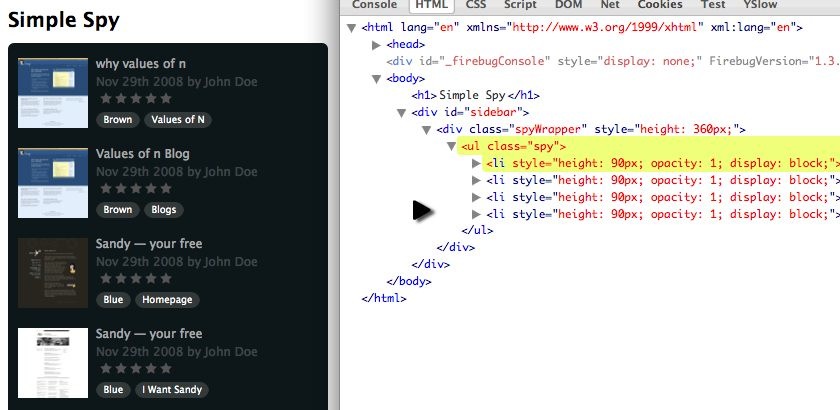
It's the QuickSnapper site (the left hand side) that makes use of the similar spy technique that I'll explain how to produce.

Watch

Watch the jQuery spy screencast (alternative flash version)

QuickTime version is approximately 60Mb, flash version is streaming.

View the demo and source code used in the jQuery spy screencast

Simple Spy

The great thing about Realmac's QuickSnapper site is that if JavaScript is turned off, the list of snaps is visible by default. So we'll follow suit.

It's also worth noting that their version only keep pulling in new items until it hits the end. I'll show you how you can keep the list looping, and in a follow up tutorial I'll show you how to hook this in to an Ajax hit that doesn't hammer your server and keeps the effect nice and smooth.

Development Tasks

I've broken down what needs to happen to be able to recreate this effect:

Setup

  1. Capture a copy/cache of li elements (for running the effect).
  2. Limit the ul to only show N li elements.

Running the Effect

  1. Insert a new item at the top that is: opacity: 0 & height: 0.
  2. Fade the last item out.
  3. Increase first item's height to real height.
  4. ...at the same time, decrease the height of the last item.
  5. Once height changes have finished, remove the last item.
  6. Repeat.

HTML

The HTML is very simple for the effect - since the non-JS version of the page the HTML appears the same, except with a longer list.

As such, rather than the complete listing, which you can see in the live demo, we're just using a simple list element:

<ul class="spy">
    <li>
      <!-- contents of list item -->
    </li>
</ul>

jQuery

For this example of code, we're creating a reusable plugin. So I've wrapped our code in the follow pattern:

(function ($) {
  
// our plugin goes here
  
})(jQuery)

This allows me to reference the $ variable knowing that it won't conflict with other libraries such as Prototype - because we've passed the jQuery variable in to the function in the following line:

})(jQuery)

Version 1: simultaneously height animate

This is the first version of the plugin. It resizes the first and last item simultaneously:

(function ($) {    
$.fn.simpleSpy = function (limit, interval) {
  // set some defaults
  limit = limit || 4;
  interval = interval || 4000;
  
  return this.each(function () {
    // 1. setup
      // capture a cache of all the list items
    var $list = $(this),
      items = [], // uninitialised
      currentItem = limit,
      total = 0, // initialise later on
      height = $list.find('> li:first').height();
          
    // capture the cache
    $list.find('> li').each(function () {
      items.push('<li>' + $(this).html() + '</li>');
    });
    
    total = items.length;
    
    // chomp the list down to limit li elements    
    $list.find('> li').filter(':gt(' + (limit - 1) + ')').remove();

    // 2. effect        
    function spy() {
      // insert a new item with opacity and height of zero
      var $insert = $(items[currentItem]).css({
        height : 0,
        opacity : 0,
        display : 'none'
      }).prependTo($list);
                    
      // fade the LAST item out
      $list.find('> li:last').animate({ opacity : 0}, 1000, function () {
        // increase the height of the NEW first item
        $insert.animate({ height : height }, 1000).animate({ opacity : 1 }, 1000);

        // AND at the same time - decrease the height of the LAST item
        $(this).animate({ height : 0 }, 1000, function () {
            // finally fade the first item in (and we can remove the last)
            $(this).remove();
        });
      });
        
      currentItem++;
      if (currentItem >= total) {
        currentItem = 0;
      }
        
      // trigger the effect again in 4 seconds
      setTimeout(spy, interval);
    }
    
    spy();
  });
};    
})(jQuery);

Version 2: fixed height

The second version has the following changes, and allows us to remove one of the animations, reducing the work the browser has to do.

We do this by created a fixed height wrapper around the ul.spy, and it works because the styling is on an outer div.

We change:

// chomp the list down to limit li elements
$list.find('> li').filter(':gt(' + (limit - 1) + ')').remove();

To add a line before that wraps our spy:

$list.wrap('<div class="spyWrapper" />').parent().css({ height : height * limit });

// chomp the list down to limit li elements
$list.find('> li').filter(':gt(' + (limit - 1) + ')').remove();

Then we need to comment out the animate height to zero.

We change:

// AND at the same time - decrease the height of the LAST item
$(this).animate({ height : 0 }, 1000, function () {
    // finally fade the first item in (and we can remove the last)
    $(this).remove();
});

To only remove the element:

// finally fade the first item in (and we can remove the last)
$(this).remove();

Version 3: loop once

Though I didn't cover this in the screencast, it's simple to change the spy to run once, by changing the following:

if (currentItem >= total) {
  currentItem = 0;
}
  
// trigger the effect again in 4 seconds
setTimeout(spy, interval)

To, if we've hit the limit, then don't set a new timeout:

if (currentItem >= total) {
  // let the spy finish
} else {
  // trigger the effect again in 4 seconds
  setTimeout(spy, interval);
}

9 Trackbacks/Pingbacks

  1. Pingback: Afficher une liste déroulante en Javascript et jQuery avec jQuery Spy | Dator Blog on December 4, 2008
  2. Pingback: JeremiahTolbert.com » Blog Archive » links for 2008-12-04 on December 4, 2008
  3. Pingback: links for 2008-12-04 « Minesa IT on December 4, 2008
  4. Pingback: Effetto Spy con jQuery | Fidicaro.net on December 5, 2008
  5. Pingback: » Bookmarks for December 5th through December 7th • mitten muses, rants and raves about life, the internet, web design and art on December 7, 2008
  6. Pingback: Simple jQuery Spy Effect | Simone D'Amico on December 13, 2008
  7. Pingback: 25 Tutorials for Advanced Freelance Web Designers | SulVision on December 15, 2008
  8. Pingback: JRC Blog » Blog Archive » Spy Effect with jQuery on December 19, 2008
  9. Pingback: Simply Spy Interface with jQuery | Netvivs on January 2, 2009

28 Comments

  1. Mark Henderson
    December 2, 2008 at 16:17

    The site has been quiet for a while... This looks really good and useful!! Thanks for sharing..

  2. Mark Henderson
    December 2, 2008 at 16:18

    All the sites I look after are financial I would love to use this effect with a news feed!

  3. Remy
    December 2, 2008 at 16:20

    @Mark - I'll be doing a follow up post on how to link this kind of effect to an Ajax feed.

    Re: being quiet - guilty as charged. Been busy with work, but I've got 3 more articles lined up for the next few weeks.

  4. Paul Grenier
    December 2, 2008 at 17:01

    I'm new to jQuery and have only been teaching myself JavaScript for the past few months, so the part I found most interesting is following your "development style."

    Thanks.

  5. digital
    December 2, 2008 at 17:02

    Great to see a new post on here, concise, easy to understand and as always an excellent result.

    Thanks!

  6. Ronald
    December 2, 2008 at 17:08

    Great job! remember to post with the ajax feed :o)

  7. Ronald
    December 2, 2008 at 18:03

    Great job! remember the post with the ajax feed :o)

  8. Zach LeBar
    December 2, 2008 at 18:35

    I'm a huge fan of jQuery for Designers. I don't really mind the time that goes by, I know ur busy, we're all busy. And they are always some of the most in-depth tuts out there for jQuery, and javascript in general. PLEASE keep 'em coming!

    -Zach LeBar

  9. zero0x
    December 2, 2008 at 18:49

    hey..

    wouldn't it be better to cache $(this).clone() instead of $(this).html() ... ??

    I mean to heave the whole <li> object, not only the contents..

  10. Remy
    December 2, 2008 at 19:40

    @zero0X - I wrote the first version using .clone() but there was an odd problem in IE, in that once it had completed the loop, putting the first one back on the list appeared to be completely blank, even though the DOM was actually there. Very strange. I think the .clone() method was also better on resources annoyingly.

  11. Daniel
    December 2, 2008 at 20:48

    Really cool stuff Remy. I really appreciate the work you're putting into this site. Following your workflow and your in depth tutorial/demos is very very educational. Your demos are always to the point and proper "real life" examples.

    I do experience a small glitch in the animation in IE7 on XP. Anyone else experiencing this?

    I also wonder if there is a nice way to get rid of the IE cleartype issue when fading text that doesn't involve too much code?

  12. Mat
    December 2, 2008 at 21:04

    Very nice. Thanks Remy.

    When the ticker initially rolls in to action, it drops off the 4th item (untitled) and pulls in the 6th item (Sandy - your free), thereby skipping the 5th item (My Tutorial's Library). Wouldn't it make more sense to pull in the 5th item first? I realise this can achieved by removing the '+1' from the 'currentItem' variable but maybe there was a reason for this?

  13. Daniel
    December 2, 2008 at 21:55

    ---- EDIT TO PREVIOUS ----

    Just to make it clear, the glitch I'm experiencing is the LI's stopping for a fraction of a second when animating down and then popping into place. It's not the problem you discuss in the screencast where the whole div would jump. I see it in both the example you posted and in the one I made myself. Unfortunately I can't compare it to the orignal since it doesn't work at all in IE.

    ---- END EDIT ---

  14. Remy
    December 2, 2008 at 22:56

    @Mat - you're right, there shouldn't be a '+1' - it was a left over from another way I was trying. I'm going to update the code to remove the +1.

    @Daniel - I know what you're talking about - I did spot that in IE. If I've got time, I'll take a look at it. I suspect it's inheriting the browser's padding(?). Perhaps including a reset stylesheet might help, or at least try:

    * { margin: 0; padding: 0; }
  15. Daniel
    December 3, 2008 at 00:02

    Have quickly tried some different resets and css settings to zero including h5,img,a,p,li,ul. Also tried removing the p tags completely ant it still jumps. Tried setting margin and padding to 0 at the same time as setting height and opacity to 0 for the $insert variable and no luck. Tried the Meyer reset as well.

    Only had time for a quick look now, getting late here. Will get back on it tomorrow :]

    Thanks again for great inspiration!

  16. caruso_g
    December 3, 2008 at 01:06

    Remy, don't worry, we are all busy but here the time spent waiting for your great tuts is widely paid back! Just a question, is it possible to stop it on mouse hover?

  17. Felix
    December 3, 2008 at 04:36

    Super sleek! I always wanted to do the spy stuff. Thanks.

  18. Steven Black
    December 3, 2008 at 06:10

    Thanks Rem!

    Each time I watch one of your videos I learn something new about FireBug.

    Therefore, a suggestion for a future screencast: "Working with FireBug Part I"

  19. k3k
    December 3, 2008 at 10:43

    A search engine friendly and useful solution. Thanks K3k

  20. Baga
    December 4, 2008 at 08:33

    Excellent stuff, thanks a lot. Anyone knows how this effect can be implemented using the prototype library instead of jquery?

  21. Erik Wulf-steen
    December 4, 2008 at 21:09

    Thanx man, this is mint!!! Great to see you in action.

    Urz

    Erik

  22. cody
    December 4, 2008 at 22:21

    Very nice!

    One thought...

    I believe you can just do this...

    items = $list.find('> li').get(); //returns an array of li elements

    instead of this

    $list.find('> li').each(function () {
      items.push('<li>' + $(this).html() + '</li>');
    });
  23. easyman
    December 10, 2008 at 00:36

    +1 for mouse over pause, and possibly a stop/start option too!

  24. phil
    December 15, 2008 at 10:51

    Hi guys,

    A fix for the jump in IE7 - simply add a float to the main list element.

    I wanted to add some padding as well, so I simply made an inner div which keeps everything nice and smooth.

    Example:

    update_ticker li  {
      float: left;
      margin: 0;
      padding: 0;
      width: 190px;
      height: 50px;
    }
    
    update_ticker .inner {
      margin: 0;
      padding: 5px 0 5px 0;
      border-top: 1px solid #222222;
      border-bottom: 1px solid #222222;
    }
    
    <li>     
      <a href="#" title="" rel="nofollow">Item One</a>
      Added: Mon. 15 December 2008</p>
    </li>

    Hope it helps everyone!

  25. Tai
    December 19, 2008 at 06:52

    I arranged the movement from right to left.

    Changed the height to width on Javascript, and fixed the <li> float to right.

  26. Dave Redfern
    December 21, 2008 at 17:26

    Hello Everyone,

    I love this effect and currently implementing it into one of my websites. How do i get it so the effect pauses while someones mouse is over a story?

    Thanks

    Dave/

  27. Jewelry
    January 1, 2009 at 12:05

    Thanx man, this is mint!!! Great to see you in action.

    Urz

  28. Mustafa Kahraman
    January 2, 2009 at 02:24

    Hi all, Very nice video ! Thanks for teaching pls keep going :) +1 pause start/stop methods

Leave a comment