Search

Play School: Easy Ajax - load

Posted on 13th January 2009 — Ajax is made incredibly simple with jQuery. There’s a number of helper functions to get in to the nitty gritty of Ajax, but if you want something that’s quick and simple to get going with the .load function is the best place to start.

.load will pull a URL from your server and load it in to the selector you specify.

Watch

Watch the jQuery Ajax load screencast (Alternative flash version)

QuickTime version is approximately 20Mb, flash version is streaming.

View the demo used in the screencast (view the source)

Search Example

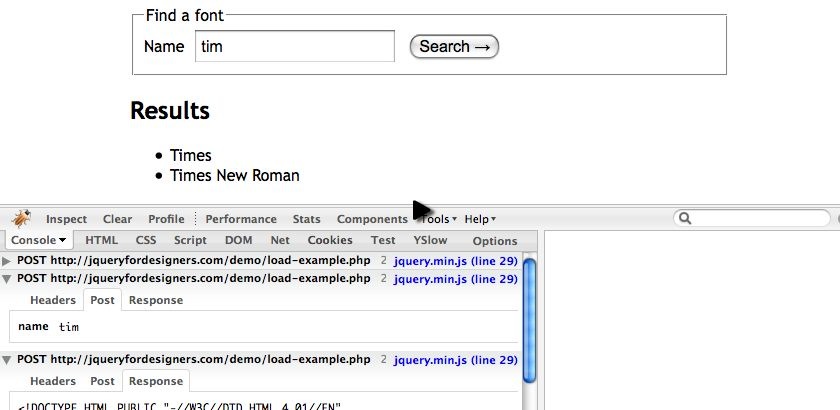
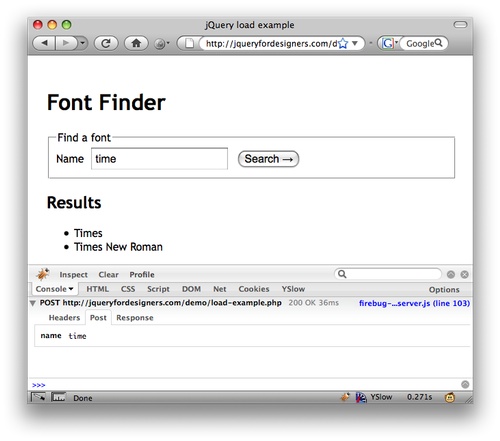
Our example has a simple search field and works initially without JavaScript enabled.

We’re going to then apply jQuery, and when the users enters a key in the search field it fires off an Ajax request.
jQuery

The jQuery required to hijax the page so that live searching can occur is very simple.

The steps required are:

  1. Trigger some code when the user keyup on the search field.
  2. Send the search string to the server and insert the contents in the DOM.

The load function takes 3 parameter, only the first is required:

load(url, data, callback)

In the screencast we change the PHP script so that it only returns the HTML fragment, such as:

<li>Times</li>
<li>Times New Roman</li>

And our jQuery was simple:

$(function () {
  $('#name').keyup(function () {
    $('#results ul').load('load-example.php', { name : this.value });
  });
});

Note that the parameters for the Ajax call are passed in separately as an object. When the parameters are passed in, the Ajax call is performed as a POST (not a GET).

Alternative Version

The final example, we decide to use the feature that allows us to load a URL and run the selector on the result.

So we call the url followed by the selector that contains the content that we’re interested in:

$(function () {
  $('#name').keyup(function () {
    $('#results ul').load('load-example.php #results ul li', { name : this.value });
  });
});
Update: It’s worth noting that as of jQuery 1.3, the load function can take a string instead of an object if so required.

Finally: Optimisation

It’s worth noting that every time the user presses a key, there’s an Ajax hit. We wouldn’t want to do this in a real situation, unless we knew our server could take the traffic.

We could run this code when the form is submitted (remember to cancel the browsers default action by return false) or we could use a delay trick to ignore a quick succession of key presses (which you can see in the Ajax to validate forms example).

Related posts

Demo

If you find this demo doesn't work as expected, it's possibly due to the demo running from within an iframe. Try running the demo in it's own window.

Source Code

<!DOCTYPE HTML PUBLIC "-//W3C//DTD HTML 4.01//EN"
    "http://www.w3.org/TR/html4/strict.dtd">
<html lang="en">
<head>
<meta http-equiv="Content-type" content="text/html; charset=utf-8">
<title>jQuery load example</title>
<style type="text/css" media="screen">
<!--
body { font: 1em "Trebuchet MS", verdana, arial, sans-serif; font-size: 100%; color: #000; padding: 20px;}
input, textarea { font-family: Arial; font-size: 100%; padding: 3px; margin-left: 10px; }
#wrapper { width: 600px; margin: 0 auto; }
</style>
</head>
<body>
<div id="wrapper">
    <h1>Font Finder</h1>
    <form action="load-example.php" method="post" accept-charset="utf-8">
        <fieldset>
            <legend>Find a font</legend>
            <label for="name">Name</label><input type="text" name="name" value="" id="name" />
            <input type="submit" value="Search &rarr;" />
        </fieldset>
    </form>
    <div id="results">
        <h2>Results</h2>
        <ul>
            <li>None so far...</li>        </ul>
    </div>
</div>
<script src="http://ajax.googleapis.com/ajax/libs/jquery/1.2.6/jquery.min.js" type="text/javascript"></script>
<script type="text/javascript" charset="utf-8">
$(document).ready(function () {
   $('#name').keyup(function () {
       $('#results ul').load('load-example.php #results li', { name : this.value });
   });
});
</script>
</body>
</html>

Comments

  1. Joe McCann On 13th January 2009 at 20:01

    Nice Remy, keep them coming.

  2. jyoseph On 14th January 2009 at 05:01

    Brilliant, super sharp and straight to the point. Thanks for such a straight forward tutorial.

  3. The Cat Lover On 14th January 2009 at 11:01

    Very good screencast, thank you.

    Another approach to get around submiting page by clicking Search button could be to bind onsubmit to that button, that invokes the ajax function, the same as on keyup. Am I right?

    And please say hello to your cat, that meowed in the background ;)

  4. Remy On 14th January 2009 at 11:01

    @Cat Lover - just to clarify, if you wanted to bind to the form submit, the code would look like this:

    $('form').submit(function () {
      // same load method, but we need to grab the input's value
      $('#results ul').load('load-example.php', { name : $('#name').val() });
    
      return false; // to cancel the browser from *really* submitting
    });
  5. k3k On 14th January 2009 at 17:01

    Another interesting screencast. Greetings from Italy.

  6. EllisGL On 14th January 2009 at 18:01

    I would have it trigger after the 3rd character to save the db from being hit too hard.

    $(function() {
      $('#name').keyup(function() {
        if($('#name').value.length > 2) {
          $('#results ul').load('load-example.php #results ul li', { name : this.value });
        }
      });
    });

  7. Frank On 16th January 2009 at 19:01

    Just found this jQuery Cheat Sheet on iTunes. Sweet!

    http://itunes.apple.com/WebObjects/MZStore.woa/wa/viewSoftware?id=302090867&mt=8

  8. Rusti On 22nd January 2009 at 16:01

    I love your work, it’s just over my head. I have hacked some of your code before, but would like to understand it enough to create something rather than hack.

    How about a beginners tutorial that shows some thing useful like a jQuery menu from scratch for VERY basic beginners. There was one on a list apart, but it lacked your great screen cast and explanations.

    I can usually work from that once I understand the basics.

    Keep up the good work.

  9. netsnake On 30th January 2009 at 16:01

    Hey, good work!

    I discovered this site yesterday and I’m already a big fan of your screencast!

    But one question, doesn’t even have that much to do with ajax: what do you use this sprintf-function for? The one you wrapped around your sql query? I haven’t ever seen this, and I don’t get what the function does :)

    Greetings from Germany

    netsnake

    @Frank: Er, can it be that u r the developer of this app? It’s great, you’re right, I bought it because of another post of yours on another website, so you’re kinda spreading this… Oh, my opinion on this: Your JavaScript Cheat Sheet isn’t the best, honestly. But the other two are ;)

  10. Tyrone On 9th August 2009 at 17:08

    The links to both the quick time and flash files are broken.

Leave your own comment
  • http://