Watch
Watch iPhone-like Sliding Headers screencast (Alternative flash version)
QuickTime version is approximately 68Mb, flash version is streaming.
View the demo used in the screencast
The Effect
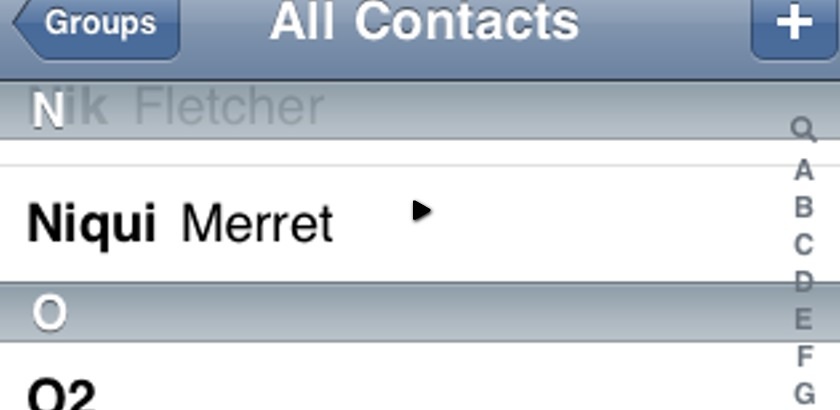
I can’t show you an example in the wild so the screenshot below will have to do for now. As the user swipes through a list, the header for that section of content remains visible at the top of the window. This gives the user context in what they’re looking at.
One really nice UI effect is when a new heading is just about to replace the existing heading, it pushes the existing heading out of view. It’s very subtle and only really visible if you perform the scroll slowly. Unfortunately, for now, we’re not replicating subtle part of the effect.
What we will do, is when the user is scrolling through an overflowing block of content, the heading for the visible block of content remain at the top. You can see the effect in action in the demo.
Creating the Effect
To create this effect we need to have a fixed position fake header sitting over the content. To do this we’re going have to mess around with the DOM using jQuery. We need to wrap the box with another box of the same height and width and give it position: relative so that our fake header can make use of position: absolute and appear to be fixed.
Now that this is sitting at the very top level, we need to bring the real headers up over the fake header, so that it appears as if they’re pushing the fake out of the way. To achieve this we’ll use a z-index on the real headers that is higher than the fake header. However, this causes it’s own problems.
All the headers now have to be position: absolute to really sit over the fake header, which also means we have to give the element a fixed height and width. This isn’t too much of a problem because we can get this information from the original.
Now that the headers are position absolute, the text that is sitting next to it falls flush against each other, because the newly positioned headers don’t flow in the document. To fix this we need to create a spacer element. In the screencast I mention this might be possible to simplify. You could duplicate the header and insert it after the original header before setting the position: absolute. To be consistent with the screencast, I’ve stuck with creating the spacer.
Finally we need to attach an event handler to the containing box, to say when there is a heading that is exactly aligned with the top of the containing box, to switch in the text from that header in to the fake and move the fake’s z-index to be at least one more than the current header (so it sits topmost).
jQuery
The jQuery job breaks down in to four parts:
- Collect the variables we’ll need for the effect
- Position and insert the fake header
- Tweak the headings to be positioned absolutely and create the spacer
- Bind the scroll event
The completed example is also available if you want to skip through each step.
Variables
We need to grab jQueryified versions of the container box and headers. We also need to create a clone of the first heading for the fake header. Finally we initialise a z-index and store the top position of the container. At first it looks like .offset().top would do, but we also need to factor in the margin-top and border-top-width, and this gives us the real top position.
Of course the whole thing is wrapped in the $(document).ready() method to ensure the code only runs once the DOM is ready.
$(document).ready(function () {
var $container = $('#box');
var $headers = $container.find('h2');
var $fakeHeader = $headers.filter(':first').clone();
var zIndex = 2;
var containerTop = $container.offset().top +
parseInt($container.css('marginTop')) +
parseInt($container.css('borderTopWidth'));
Inserting the Fake Header
This is a pretty straight forward process:
- Wrap the container in a box, in my case I’ve reused the
boxclass name so that it’s the same width and height, but more importantly:position: relative - Set the CSS on the
$fakeHeadervariable - Inherit details from the first original header, such as the width and text
$container.wrap('<div class="box" />');
$fakeHeader.css({
zIndex: 1,
position: 'absolute',
width: $headers.filter(':first').width()
});
$container.before($fakeHeader.text($headers.filter(':first').text()));
Absolutely Positioning Headings
Since we’re absolutely positioning the headings we’ll need to manually reset the width of the element. We’re also setting a constantly incrementing z-index that the fake header can borrow from to jump above the real heading.
Once the headings are absolutely positioning, they no longer affect the flow of the document, and the adjacent elements now sit flush against each other. Now we need to manually correct this issue just using a spacer element. I’ve created a new empty div element and set the height and width to the outerHeight and outerWidth of the heading. It’s important that we select the outerHeight rather than just height because we need to include the margin around that element.
I’d suggest that if you’re using this technique in a live environment, you can either do it using code (as I have done in this example), or if you’re finding that it doesn’t match up 100%, you can create a class in your CSS that prepares that spacer, then apply the class to the newly inserted div.
$headers.each(function () {
var $header = $(this);
var height = $header.outerHeight();
var width = $header.outerWidth();
$header.css({
position: 'absolute',
width: $header.width(),
zIndex: zIndex++
});
// create the white space
var $spacer = $header.after('<div />').next();
$spacer.css({
height: height,
width: width
});
});
Using the Scroll Event to Trigger the Effect
As the user scrolls the overflowing container element, we need to track where our fake header is, and once it passes underneath a real header, the fake header will match the text and use a high z-index.
To achieve this, we bind a scroll event to the container element, and as it is being scrolled, we loop through the headings checking it’s top position.
If the top position is less than the top position of the container (remember we included margin and border width to accurately ascertain this), then we copy that heading’s details across to the fake heading.
The effect that we achieve is that as the fake header passes under the real header, as soon as they’re in the same location visually on the page, the fake header pops over the real header giving the illusion that the heading is now locked in position.
$container.scroll(function () {
$headers.each(function () {
var $header = $(this);
var top = $header.offset().top;
if (top < containerTop) {
$fakeHeader.text($header.text());
$fakeHeader.css('zIndex', parseInt($header.css('zIndex'))+1);
}
});
});
That’s all we need. As you’ll see with any of these tutorials, we just need to break the task in to smaller tasks and apply the solutions a bit at a time.
Check out the final iPhone-like Sliding Headers demo and let me know if you implement this technique in a real web site in the wild.
A Note About IE
IE8 is fine and matches this effect perfect. Of course IE6 & IE7 have to put their boot in, but only a little. There’s one subtle difference in IE6 & 7 due to a bug in their z-index stack model. The bug is that the fake header doesn’t pass underneath, but over the top. I’ve had people look at the effect in IE and say nothing’s wrong - but now that I’ve pointed it out to you, you’ll see where the error is.
I know playing with the position: relative will help, but I’m not 100% sure how to fix this just yet. So I challenge you, dear reader, to see if you can get it working in IE7. Good luck - I have hope in you!
You should follow me on Twitter here I tweet about jQuery amongst usual the tweet-splurges!
Related posts
Demo
If you find this demo doesn't work as expected, it's possibly due to the demo running from within an iframe. Try running the demo in it's own window.
Source Code
<!DOCTYPE HTML PUBLIC "-//W3C//DTD HTML 4.01//EN"
"http://www.w3.org/TR/html4/strict.dtd">
<html lang="en">
<head>
<title>Header Slide</title>
<meta http-equiv="Content-Type" content="text/html; charset=utf-8">
<style type="text/css" media="screen">
.box {
margin: 0 auto;
height: 400px;
width: 400px;
position: relative;
border: 5px solid #999;
}
#box {
overflow: auto;
position: relative;
}
h2 {
background: #999;
margin: 0;
opacity: 1;
padding: 10px;
color: #fff;
}
#box p {
margin: 10px;
}
/* JS required styles */
.box .box {
border: 0;
}
</style>
<script type="text/javascript" src="http://ajax.googleapis.com/ajax/libs/jquery/1.3.2/jquery.min.js"></script>
<script type="text/javascript">
$(document).ready(function () {
// 1. grab a bunch of variables
var $container = $('#box');
var $headers = $container.find('h2');
var zIndex = 2;
var containerTop = $container.offset().top + parseInt($container.css('marginTop')) + parseInt($container.css('borderTopWidth'));
var $fakeHeader = $headers.filter(':first').clone();
// 2. absolute position on the h2, and fix the z-index so they increase
$headers.each(function () {
// set position absolute, etc
var $header = $(this), height = $header.outerHeight(), width = $header.outerWidth();
zIndex += 2;
$header.css({
position: 'absolute',
width: $header.width(),
zIndex: zIndex
});
// create the white space
var $spacer = $header.after('<div />').next();
$spacer.css({
height: height,
width: width
});
});
// 3. bind a scroll event and change the text of the take heading
$container.scroll(function () {
$headers.each(function () {
var $header = $(this);
var top = $header.offset().top;
if (top < containerTop) {
$fakeHeader.text($header.text());
$fakeHeader.css('zIndex', parseInt($header.css('zIndex'))+1);
}
});
});
// 4. initialisation
$container.wrap('<div class="box" />');
$fakeHeader.css({ zIndex: 1, position: 'absolute', width: $headers.filter(':first').width() });
$container.before($fakeHeader.text($headers.filter(':first').text()));
});
</script>
</head>
<body>
<!-- <h1>Fixed Header Slide</h1> -->
<div class="box" id="box">
<h2>Header 1</h2>
<p>Lorem ipsum dolor sit amet, consectetur adipisicing elit, sed do eiusmod tempor incididunt ut labore et dolore magna aliqua. Ut enim ad minim veniam, quis nostrud exercitation ullamco laboris nisi ut aliquip ex ea commodo consequat. Duis aute irure dolor in reprehenderit in voluptate velit esse cillum dolore eu fugiat nulla pariatur. Excepteur sint occaecat cupidatat non proident, sunt in culpa qui officia deserunt mollit anim id est laborum.</p>
<h2>Header 2</h2>
<p>Lorem ipsum dolor sit amet, consectetur adipisicing elit, sed do eiusmod tempor incididunt ut labore et dolore magna aliqua. Ut enim ad minim veniam, quis nostrud exercitation ullamco laboris nisi ut aliquip ex ea commodo consequat. Duis aute irure dolor in reprehenderit in voluptate velit esse cillum dolore eu fugiat nulla pariatur. Excepteur sint occaecat cupidatat non proident, sunt in culpa qui officia deserunt mollit anim id est laborum.</p>
<h2>Header 3</h2>
<p>Lorem ipsum dolor sit amet, consectetur adipisicing elit, sed do eiusmod tempor incididunt ut labore et dolore magna aliqua. Ut enim ad minim veniam, quis nostrud exercitation ullamco laboris nisi ut aliquip ex ea commodo consequat. Duis aute irure dolor in reprehenderit in voluptate velit esse cillum dolore eu fugiat nulla pariatur. Excepteur sint occaecat cupidatat non proident, sunt in culpa qui officia deserunt mollit anim id est laborum.</p>
<h2>Header 4</h2>
<p>Lorem ipsum dolor sit amet, consectetur adipisicing elit, sed do eiusmod tempor incididunt ut labore et dolore magna aliqua. Ut enim ad minim veniam, quis nostrud exercitation ullamco laboris nisi ut aliquip ex ea commodo consequat. Duis aute irure dolor in reprehenderit in voluptate velit esse cillum dolore eu fugiat nulla pariatur. Excepteur sint occaecat cupidatat non proident, sunt in culpa qui officia deserunt mollit anim id est laborum.</p>
<h2>Header 5</h2>
<p>Lorem ipsum dolor sit amet, consectetur adipisicing elit, sed do eiusmod tempor incididunt ut labore et dolore magna aliqua. Ut enim ad minim veniam, quis nostrud exercitation ullamco laboris nisi ut aliquip ex ea commodo consequat. Duis aute irure dolor in reprehenderit in voluptate velit esse cillum dolore eu fugiat nulla pariatur. Excepteur sint occaecat cupidatat non proident, sunt in culpa qui officia deserunt mollit anim id est laborum.</p>
<h2>Header 6</h2>
<p>Lorem ipsum dolor sit amet, consectetur adipisicing elit, sed do eiusmod tempor incididunt ut labore et dolore magna aliqua. Ut enim ad minim veniam, quis nostrud exercitation ullamco laboris nisi ut aliquip ex ea commodo consequat. Duis aute irure dolor in reprehenderit in voluptate velit esse cillum dolore eu fugiat nulla pariatur. Excepteur sint occaecat cupidatat non proident, sunt in culpa qui officia deserunt mollit anim id est laborum.</p>
</div>
</body>
</html>

Play QuickTime version
Play Flash version
Baylor Rae' On 10th September 2009 at 18:09
This is such a cool effect, I’ve often thought about creating it, but I would have done it completely different and I probably would have failed.
-Baylor
Martin On 10th September 2009 at 19:09
What a cool effect! Bit of a long code for my personal liking but I can see a real life use in many of the projects I’m involved in! Thank you very much!
Martin
Cameron Baney On 10th September 2009 at 21:09
Wow, this is an amazing effect. I always loved how the iPhone did it. Can’t wait to think of a way to use this in my designs, thanks!
vik On 11th September 2009 at 10:09
Very beatifull effect, thanks!
Reece On 11th September 2009 at 16:09
what the deuce? not working for me in FF 3.5.3
Reece On 11th September 2009 at 16:09
okay, i’m retarded. It does work.
Remy On 11th September 2009 at 16:09
@Reece - yeah, I’ve just spotted the demo tab doesn’t let the demo render properly. It’s because it’s running inside an iframe, and sometimes it screws the rendering up - but I assume you’ve now spotted that it works fine in a standalone window.
Ron On 11th September 2009 at 18:09
Thanks for this example great work .. just finished a similar problem with tables and that was a lot of code and not cross-browser and ‘cross-doctype’. But this is really a piece of thinking outside the box.. and good use of jQuery. And about the length… isn’t this small enough? Just thinking.. will this also be possible with nested tables with thead and tbody elements.. with collapsed borders? I don’t get the hang of the cross-browser calculation of table row heights with different doctypes and different browsers.. hope that this will work too with tables.
Remy On 11th September 2009 at 20:09
@Ron - if I’ve correctly interpreted what you’re trying to do - you’re trying to lock
<thead<elements as the user scrolls a table. IIRC I did something similar for a client a while back - but I ran in to some serious rendering bugs in both Firefox and Safari - I think that was combined with an overflow on the<tbody<. Pretty crazy stuff, but semantically sound and should have rendered properly. Alas IE was the only browser doing it properly!!!None the less - good luck, and let us all know if you make use of this technique so we can see your efforts (same goes for everyone else out there!).
Steward On 12th September 2009 at 18:09
Look at here http://anton.shevchuk.name/javascript/jquery-iphone-ui/#more-1087 - on russain, but I hope you understand code :)
Ron On 15th September 2009 at 10:09
@Remy - yes thats what I tried to do and also got to the firefox bug too. (surprised to find something working in IE and not in FF). ( scrolling content leaving the lines behind and table lines show outside hidden overflow.. bug is already reported and hope this will be fixed in new version of FF). but hope to get this done in IE then first. When I have the code with the help of your example I will share this code here. I think the only thing I need to do more is to set the th or td width before I set the copy to position absolute so the columns still align.. But in IE 6 you only needed to position the row relative and the wrapper with overflow and the row is positioned fixed.
Jon On 15th September 2009 at 20:09
big fan of your podcasts, i’ve learn’t a lot from you.
i’d just like to say this is slightly wrong… the top header should get pushed up by the next one, so they kind of stack and push up rather than overlay each other. i’ll try and figure that out myself and post it here ;)
keep up the good work!
Remy On 16th September 2009 at 23:09
@Jon - not wrong, just different ;-) I did actually start investigating the push effect and may possibly return to it again in the future, but the initial tests I did found it to be pretty tricky.
I had to do something like when the “original” header was scrolled to, fix the position of the fake - directly above the “original” and as the fake came out of view, switch it in front of the “original” taking it’s text value - and then add all the code to support the reverse of that (i.e. scrolling up).
That said, if you do figure out a good technique to get it working - do post it up here too! :-)
Floj On 19th September 2009 at 00:09
@Remy - I bet the solution to the “Push” thing is to remember the position of each header, when the closest header hits it, it triggers an function that makes the current header to apply the default “position: static” so the header starts to slide with the page, and when the new header hits “top” it sets “position: absolute”… Something like that should work(?) =) Hope you have time too test it!
Gordon On 21st September 2009 at 09:09
Remy,
Thanks for producing these screencasts. After watching a bunch I wanted to leave a comment. I really like the commentary style and how you present the tutorials. I am not sure if it is intentional but every screencast you seem to run into one unexpected problem or another. A honest bug will crop up and sometimes you struggle with it and then find the answer. I am not sure it this is intentional or accidental. But the effect is very good from a didactic perspective. Quite brilliant actually. It reveals the debugging thought process. I would argue in some ways this is way more important than just seeing the finished code. Your screencasts really do an excellent job of demonstrating the way to think through the problem. I have been a web developer for many years but I really learned a lot watching the way you tackle the problem. It has been very enlightening. And please understand that when you make “mistakes” in the screencast you are not “wasting our time”. In fact you are providing very useful insight in the mind of a designer/coder. This stuff is pure gold.
Keep up the good work and hope to see many, many more screencasts from you.
Justin West On 25th September 2009 at 15:09
Great video on the Automatic Infinite Carousel. It’s a great beginner’s tutorial for the reason that it shows the importance of reusable code (plugin), and highlights the effectiveness of FireBug as a development tool which i think is often overlooked by beginners.
Great presentation, I hope to see more.
Justin T. West Ektron.com
Ultinio On 27th September 2009 at 20:09
Hi Remy, just wondering why we have to set position:absolute on the h2… Well, you’re gonna say, the z-index doesn’t work without but z-index works ONLY if you set a position property. So set it to relative and then, you don’t need the empty divs, nor to set the width for every h2… What do you think? Great video though, as always ;) Cheers
Ultinio On 28th September 2009 at 10:09
Great video, as always… Though why to set every h2 position:absolute? if it is only for the z-index property, use position:relative. That way, no point to create empty divs for space, no need to set a width on the h2. Easier and shorter code. What do you think? Cheers !
Andre On 16th October 2009 at 13:10
amazing!!!
the website is great, the tutorials makes the effects easy to use. i hope you continue with that beautiful work!
PS.: sorry for my bad english! :)
kamal On 16th October 2009 at 19:10
coooooooool, amazing, thanks for sharing this.
jBoyle On 18th October 2009 at 06:10
That’s a pretty neat emulation of that specific iPhone UI behaviour, though it lacks the small part where the next header coming nudges the current one up and off the screen to take it’s place (stated in a previous comment as you know). I’ll also take a look to see if I can add that function but I’m a bit far from your level of jQuery usage.
Thanks for sharing this
marpar77 On 13th November 2009 at 02:11
Great job Remy, watching you work is real treat. I especially like to see your process, it’s really helping me take my coding to the next level.
Thanks for sharing.
Peter Galiba On 11th December 2009 at 01:12
Instead of position:absolute for the real headers you could use position: relative, and then the z-index would still be applied, and you wont need the placeholder divs.
Conrad Taylor On 20th December 2009 at 00:12
Remy, great screencasts on jQuery. Anyway, would it possible to resize this screencast to 640×480 or export the raw footage for the iPhone so that one can store the podcast episode onto the iPhone?
Keep up the great work,
-Conrad
fukid On 5th January 2010 at 22:01
Great Job!