Animation Jump - quick tip

19Aug

jQuery has got good base level support for effects out of the box. Setting them up and using them to reveal and hide elements is exceptionally easy.

However, on more than one occasion I've found that after creating a sliding effect, the animation jumps on completion.

Having found the cause, I thought it only fair to share and explain why it's happening and how to avoid it.

Watch the animation jump fix screencast (alternative flash version)

QuickTime version is approximately 7Mb, flash version is streaming.

View the demo and source code used in the screencast

Understanding the Problem

The way the slide animation works is it animates the height CSS property of the element. The problem occurs if the element being animated has a margin or padding.

This is because when the element shifts from display: none to a tiny height (or width) and visa versa, the padding (or margin) jumps in to view, causing the real height to be height + padding + margin.

If you look at the screenshot below, you can see the padding is still visible but the height of the element is 1px, the next step is the to display: none, which in this case, the blocks below will jump up 32px (padding-top + padding-bottom).
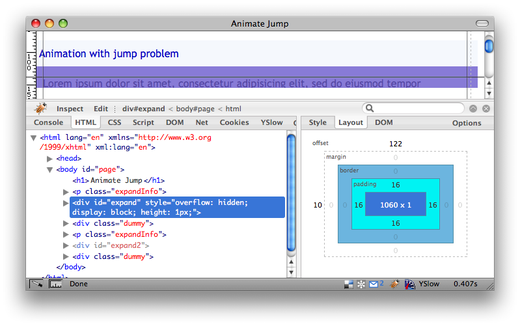
Animation jump example

Fixing the Problem

The solution is very simple to fix once you've understood the problem.

The problematic code would have the following style:

#expand {
  padding: 16px;
  display: none;
}

The code required to create the smooth animation is:

#expand {
  display: none;
}

#expand div {
  padding: 16px;
}

We've moved the padding away from the animating element and so only the height affects the height of the sliding block.

View the working demo

2 Trackbacks/Pingbacks

  1. Pingback: Weekly Web Nuggets #26 : Code Monkey Labs on August 23, 2008
  2. Pingback: CSSKarma - Finding balance between design and development on September 4, 2008

36 Comments

  1. Rusti
    August 19, 2008 at 14:11

    I think this is a fantastic little tutorial.

    I wonder if you have ever thought about publishing some VERY basic tutorials for jQuery? I would love to get started with it (as I always learn fast once I have the basics) but haven't found any beginner tutorials that are as well illustrated and thought out as your more advanced tutorials here.

    Again, great job.

  2. Eystein
    August 19, 2008 at 14:19

    That makes so much sense! Thank you. I've been annoyed by this problem but never bothered trying to bugfix it. And to think that IE6 don't have the jumpy problem (sometimes) oughta ring some bells early on.

  3. bobmoff
    August 19, 2008 at 14:33

    Simple as that. This has bothered me before, thanks for a nice and simple solution.

  4. Remy
    August 19, 2008 at 15:22

    @Rusti - I've been giving some thought to doing screencast introductions to the jQuery API focusing on particular functions like show/hide, selectors, ajax, etc.

  5. aldomatic
    August 19, 2008 at 17:09

    This is great! I have been wondering where that issue was coming from.

    Thanks!

  6. Ray
    August 19, 2008 at 17:59

    This solution is really neat, thanks!

  7. Joe
    August 19, 2008 at 18:18

    Awesome. This has been such a pain for me with a number of projects. Thanks!

  8. greenerist
    August 19, 2008 at 18:36

    haha nice! i just noticed this issue last week on one of my projects and now you found the cause and solution :)

  9. Marvin
    August 19, 2008 at 21:16

    wow, and i always wondered why it jumps! helped me a lot!

  10. Jack
    August 19, 2008 at 21:58

    Thanks so much for taking the time to write this up.

  11. Music Instruments
    August 20, 2008 at 07:54

    wow information provided through is post I Really liked it.Thanks for sharing.

  12. K3k
    August 21, 2008 at 07:27

    Another good tutorial. Greetings from Italy

  13. David Behan
    August 21, 2008 at 21:31

    Great little tip. Had this issue pop it's ugly little head today and remembered seeing something in my rss reader on how to fix it. Great content on this site... keep it up.

  14. Brian
    August 22, 2008 at 17:49

    The solution is very similar to one of the methods to use to adjust the box model in IE 6. Instead of creating additional styles for IE 6, just put your width and height on a wrapper div, then put the padding you want on an inner div. It requires an extra tag, but it has additional benefits (in addition to adjusting for the box model) such as being able to apply a 2nd background to a region. I use this method frequently, but didn't know why my animations jumped until now. Thanks for the insight.

  15. Ekrem Büyükkaya
    August 25, 2008 at 01:18

    This is great...I've been searching a solution for 2 days. Thanks

  16. Paul Gendek
    August 26, 2008 at 15:00

    Generally you don't want to apply margin/padding to containers anyway, especially when you set a width.

  17. Tree
    August 28, 2008 at 21:57

    For Safari there is still a pixel height jump with autoHeight enabled. This is without any border,margin and padding on the animated element. Are there any work around for this issue?

    You can see this behavior in the Jquery demo page with Safari 3.1.2 : http://dev.jquery.com/view/trunk/plugins/accordion/demo/

  18. Kalimari
    September 4, 2008 at 18:31

    Thanks! That's an excellent tip. Shame about the unnecessary nested element to handle margin/padding, but that's a CSS (not jQuery) issue... Ditto Paul Gendek's post.

  19. Dave Ellis
    September 11, 2008 at 10:51

    I'm having this problem because my

    has padding on it and I can't find a workaround - how can I retain the relevant padding on my p element, yet lose the jump?

  20. Dave Ellis
    September 11, 2008 at 10:52

    the missing text above should say p element

  21. Dave Ellis
    September 11, 2008 at 12:03

    This doesn't seem to work for me when my hidden div has 2 paragraphs of text inside it that are padded with the p tag. I can't seem to find a workaround, other than setting the padding on the p tag to 0, but then that doesn't format my text the way I would like it - can anyone help??

  22. Remy
    September 11, 2008 at 12:13

    @Dave - if you post up a working URL to the problem you're working on, someone, or I, might be able to take a look and propose a fix. Cheers.

  23. Dave Ellis
    September 11, 2008 at 21:52

    Hi Remy, thanks for the response - the working URL is the link from my name - yep, I'm editing live!

  24. Dave Ellis
    September 11, 2008 at 22:46

    Oh - and I should say, it's the More... link under the intro para

  25. banner ads
    September 15, 2008 at 06:56

    Thanks! That's an accomplished tip. Shame about the accidental nested aspect to handle margin/padding, but that's a CSS (not jQuery) issue... Ditto Paul Gendek's post.

  26. Charles Himmer
    September 15, 2008 at 16:14

    Thanks, I've been wondering about that!

  27. Tech blog
    September 19, 2008 at 02:10

    You know this tutorial for animation can also help newbies....Its quite clear from where i look at it.... :)

  28. Brian
    September 19, 2008 at 20:04

    I'm encountering the same bug Dave Ellis is seeing, which I think is caused by margin collapsing on the paragraph tags. I removed the top margin from my <p>'s and the jump virtually disappeared. I say virtually because I still get a little shimmy (yes, I said shimmy) on the bottom of the animating div.

  29. louis
    September 25, 2008 at 18:02

    fantastic. your screen casts are perfectly executed and very helpful!

  30. ignite
    September 30, 2008 at 20:12

    Man, that always bugged me! Thanks for sharing that. Totally makes sense now.

  31. Ray
    October 3, 2008 at 18:32

    Love it! Thank You.

  32. tfforums
    October 9, 2008 at 04:46

    i'm having a similar problem with animate function - however its do do with animating the height and width of a relatively positioned image. The image jumps to a spot and then jumps back. its animated with: - any ideas? $("img").filter(".button").hover(function() { $(this).animate({height:"69px",width:"70px"},time); }, function() { $(this).animate({height:"60px",width:"60px"}, time); });

  33. Fen
    October 18, 2008 at 00:46

    I was having this problem, and annoyingly, this solution wouldn't work for me. After a bit of debugging I found out that the negative margin and width of a parent element was causing the issue; unfortunately the design depended on these values.

    My solution was to find the height of the element being animated before hiding, and then apply the height value before animating it:

    var $elementHeight = $("#element").height(); $("#element").hide(); $("a").click(function() { $("#element").css({height: $elementHeight}); $("#element").slideToggle(800); return false; });

    Hope this saves someone else an hour or two :)

  34. Daan
    October 18, 2008 at 16:03

    I also had an animation jump problem, but that was because the animated div content had EM sizes in it. To fix it, I had to change it to px or %. Maybe this can help somebody.

  35. Musical Instrument
    November 6, 2008 at 11:16

    Thanks! That's an able tip. Shame about the adventitious nested aspect to handle margin/padding, but that's a CSS (not jQuery) issue... Ditto Paul Gendek's post.

  36. Luke
    November 11, 2008 at 10:49

    Thanks so much, I've always hated this problem.

    I wonder how mootools manages to avoid this problem.. perhaps it automatically detects margins and padding and also animates them to zero.. That could be a more semantic solution.

    Otherwise, a great tip, and thanks a million!

Leave a comment