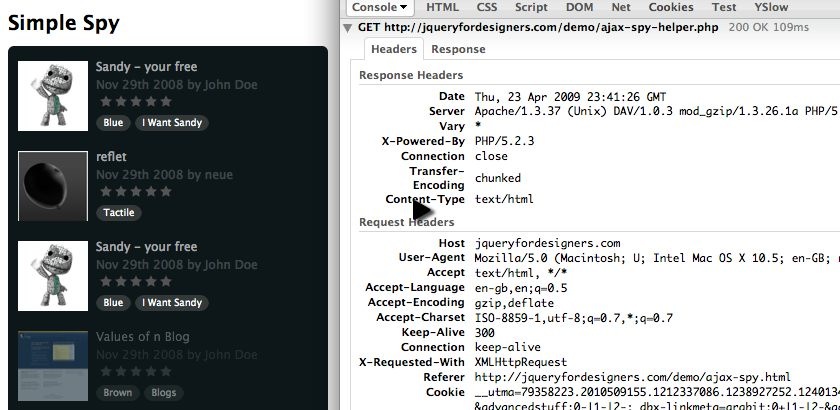
Watch
Watch the jQuery Ajax spy screencast (Alternative flash version)
QuickTime version is approximately 45Mb, flash version is streaming.
View the demo used in the screencast (view the source for the Ajax response)
Breaking down the problem
My key priority for me, when I’m writing code that will make Ajax hits, is that where possible, I’m throttling the number of hits. By this I mean, I’m only performing Ajax requests when I absolutely have to.
To achieve this, I’ll show you in the code where I have created a hidden store of the Ajax response that I use to populate the spy at the preset interval. This gives the impression of real-time data. It’s almost real-time, and since we’re not working with finance systems or data that absolutely has to be real-time, it’s acceptable.
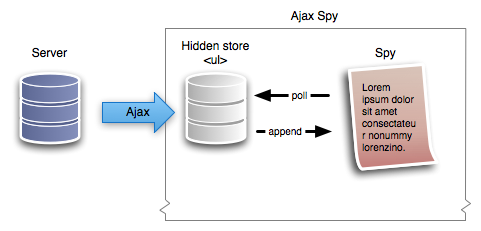
The way this is achieve is that we create a hidden store, in our case a ul element, and collecting the Ajax results in the ul. At the same time, the spy is requesting the latest (i.e. the top) li element in our store. When the store gets down to the last item, it refills itself.
It might sound a bit fiddly, but it’s a very straight forward change to the previous spy.
Here’s a visualisation of, roughly, what’s going on:
HTML
As per the original spy, we simply prepare a contain (prefill for those without JS) of latest products:
<ul class="spy">
<li>
<!-- contents of list item -->
</li>
</ul>
Server Side
I’ve created a dummy server spy which you can view the source for. It’s nothing special, and for the demo, doesn’t use a database. It creates an array of data, randomises it and then loops through 5 of the results returning HTML.
In a production environment, I would expect this to make use of the database, and grab perhaps slightly more items to show in the spy.
jQuery (changes)
Since our starting point is the simple spy, I wanted to show where you need to make adjustments to ajaxify the script.
You may want to download the original simple spy.
Creating the Store
The first job is create the ‘caching’ store that will hold the Ajax results, and will refill itself when it’s almost empty.
With in the plugin code (but before return this.each()) we create a new function.
It needs to achieve the following tasks:
- Return the lastest/top item from the store.
- Remove that top item from the store.
- If we’re returning the last item from the store, refill via an Ajax hit
function getSpyItem($source) {
// find all the li direct descendants in the store ($source is a ul)
var $items = $source.find('> li');
// if we only have 1 left, we need to do an ajax hit to get more
if ($items.length == 1) {
// do an hit to get some more
// see playschool: ajax load for a screencast on .load
$source.load('ajax-spy-helper.php');
} else if ($items.length == 0) {
// if there are none left, then return false and handle it properly.
return false;
}
// grab the first item, and remove it from the $source
return $items.filter(':first').remove();
}
Changing the Spy Function
Originally the spy cached a copy of all the li elements and looped round them. We had a bit of logic to handle tracking whether we reached the end or not. With the Ajax version we don’t need any of this code - since our store should be infinite (since we’re getting it live from the server).
Where we had this code:
var $insert = $(items[currentItem]).css({ // ...
Which reads the items array, we’ll change this to use the getSpyItem function:
var $item = getSpyItem($source); // $source is declared early (see below)
if ($item != false) { // i.e. there's a result to work with
var $insert = $item.css({ // ...
}
We will also remove the currentItem logic within the spy function (and remove the declarations too - i.e. var currentItem since we don’t need it anymore).
Initialising the Spy
Now that our code is nearly ready, we need to make sure we initialise properly.
The tasks we have left are:
- Create the store, and save it in the
$sourcevariable (as used above) - Only show
liaccording to thelimit, and move the remainder in to the$sourceulelement.
Within the this.each() initialisation block, we’ll create our store, at the same time we hide it and append it to the DOM:
var $source = $('<ul />').hide().appendTo('body');
Then change:
$list.find('> li').filter(':gt(' + (limit - 1) + ')').remove();
To the following, so that the ‘left over’ elements are in the store, ready to be grabbed in getSpyItem:
$list.find('> li').filter(':gt(' + (limit - 1) + ')').appendTo($source);
And Finally…
We can add a mouse over to pause the spy. It’s very simple.
In the spy function, we wrap the logic that grabs new items with:
if (running) { // rest of spy code
However, make sure the setTimeout recursive call is outside this if statement so that it keeps checking.
Then we bind two custom events to the spy in the initialisation phase of the plugin:
$list.bind('stop', function () {
running = false;
}).bind('start', function () {
running = true;
});
And finally, when we attach our plugin, we can trigger the stop and start events when the mouse enters and leaves (note I’m using enter/leave rather than in/out):
$('ul.spy').simpleSpy().bind('mouseenter', function () {
$(this).trigger('stop');
}).bind('mouseleave', function () {
$(this).trigger('start');
});
You should follow me on Twitter here I tweet about jQuery amongst usual the tweet-splurges!
Related posts
Demo
If you find this demo doesn't work as expected, it's possibly due to the demo running from within an iframe. Try running the demo in it's own window.
Source Code
<!DOCTYPE html PUBLIC "-//W3C//DTD XHTML 1.0 Strict//EN"
"http://www.w3.org/TR/xhtml1/DTD/xhtml1-strict.dtd">
<html xmlns="http://www.w3.org/1999/xhtml" xml:lang="en" lang="en">
<head>
<meta http-equiv="Content-type" content="text/html; charset=utf-8" />
<title>Simply Spy</title>
<style type="text/css" media="screen">
<!--
/* Style and images take for example purposes only from http://www.quicksnapper.com */
body { font: 1em "Lucida Grande",Lucida,Verdana,sans-serif; font-size: 62.5%; line-height: 1;}
input, textarea { font-family: Arial; font-size: 125%; padding: 7px; }
label { display: block; }
p { margin: 0; margin-bottom: 4px;}
h5 { margin: 0; font-weight: normal; }
a:link,
a:hover,
a:visited {
color: #fff;
}
#sidebar {
color: #AFB0B1;
background: #0D171A;
float:left;
margin:0 0 24px;
padding:15px 10px 10px;
width:300px;
}
#sidebar ul {
font-size:1.2em;
list-style-type:none;
margin:0;
padding:0;
position:relative;
}
.rating {
background-image:url(http://static.jqueryfordesigners.com/demo/images/simple-spy/info_bar_stars.png);
background-repeat:no-repeat;
height:12px;
text-indent:-900em;
font-size:1em;
margin:0 0 9px;
}
.none {
background-position: 82px 0px;
}
.four {
background-position: 82px -48px;
}
.five {
background-position: 82px -60px;
}
.tags {
color: #fff;
margin: 0.5em;
}
.tags a,
.tags span {
background-color: #333839;
font-size: 0.8em;
padding: 0.1em 0.8em 0.2em;
}
.tags a:link,
.tags a:visited {
color: #fff;
text-decoration: none;
}
.tags a:hover,
.tags a:active {
background-color: #3e4448;
color: #fff;
text-decoration: none;
}
#sidebar li {
height: 90px;
overflow: hidden;
}
#sidebar li h5 {
color:#A5A9AB;
font-size:1em;
margin-bottom:0.5em;
}
#sidebar li h5 a {
color:#A5A9AB;
text-decoration:none;
}
#sidebar li img {
float:left;
margin-right:8px;
}
#sidebar li .info {
color:#3E4548;
font-size:1em;
}
#sidebar .info a,
#sidebar .info a:visited {
color:#3E4548;
text-decoration: none;
}
#sidebar .spyWrapper {
height: 100%;
overflow: hidden;
position: relative;
}
#sidebar {
-webkit-border-radius: 5px;
-moz-border-radius: 5px;
}
.tags span,
.tags a {
-webkit-border-radius: 8px;
-moz-border-radius: 8px;
}
a img {
border: 0;
}
-->
</style>
<script src="jquery-1.3.1.js" type="text/javascript"></script>
<script type="text/javascript" charset="utf-8">
$(function () {
$('ul.spy').simpleSpy().bind('mouseenter', function () {
$(this).trigger('stop');
}).bind('mouseleave', function () {
$(this).trigger('start');
});
});
(function ($) {
$.fn.simpleSpy = function (limit, interval) {
limit = limit || 4;
interval = interval || 4000;
function getSpyItem($source) {
var $items = $source.find('> li');
if ($items.length == 1) {
// do an hit to get some more
$source.load('ajax-spy-helper.php');
} else if ($items.length == 0) {
return false;
}
// grab the first item, and remove it from the $source
return $items.filter(':first').remove();
}
return this.each(function () {
// 1. setup
// capture a cache of all the list items
// chomp the list down to limit li elements
var $list = $(this),
running = true,
height = $list.find('> li:first').height();
// TODO create the $source element....
var $source = $('<ul />').hide().appendTo('body');
$list.wrap('<div class="spyWrapper" />').parent().css({ height : height * limit });
$list.find('> li').filter(':gt(' + (limit - 1) + ')').appendTo($source);
$list.bind('stop', function () {
running = false;
}).bind('start', function () {
running = true;
});
// 2. effect
function spy() {
if (running) {
var $item = getSpyItem($source);
if ($item != false) {
// insert a new item with opacity and height of zero
var $insert = $item.css({
height : 0,
opacity : 0,
display : 'none'
}).prependTo($list);
// fade the LAST item out
$list.find('> li:last').animate({ opacity : 0}, 1000, function () {
// increase the height of the NEW first item
$insert.animate({ height : height }, 1000).animate({ opacity : 1 }, 1000);
// AND at the same time - decrease the height of the LAST item
// $(this).animate({ height : 0 }, 1000, function () {
// finally fade the first item in (and we can remove the last)
$(this).remove();
// });
});
}
}
setTimeout(spy, interval);
}
spy();
});
};
})(jQuery);
</script>
</head>
<body>
<h1>Simple Spy</h1>
<div id="sidebar">
<ul class="spy">
<li>
<a href="#" title="View round"><img width="70" height="70" src="http://static.jqueryfordesigners.com/demo/images/simple-spy/1.png" title="" /></a>
<h5><a href="#" title="View round">round</a></h5>
<p class="info">Nov 29th 2008 by <a href="#" title="Visit neue's userpage.">neue</a></p>
<p class='rating none'>Not Rated</p>
<p class="tags"></p>
</li>
<li>
<a href="#" title="View reflet"><img width="70" height="70" src="http://static.jqueryfordesigners.com/demo/images/simple-spy/2.png" title="" /></a>
<h5><a href="#" title="View reflet">reflet</a></h5>
<p class="info">Nov 29th 2008 by <a href="#" title="Visit neue's userpage.">neue</a></p>
<p class='rating none'>Not Rated</p>
<p class="tags"><a href="#" title='Find more images tagged Tactile'>Tactile</a></p>
</li>
<li>
<a href="#" title="View Kate Moross Little Big Planet"><img width="70" height="70" src="http://static.jqueryfordesigners.com/demo/images/simple-spy/3.png" title="" /></a>
<h5><a href="#" title="View Kate Moross Little Big Planet">Kate Moross Little Big Planet</a></h5>
<p class="info">Nov 29th 2008 by <a href="#" title="Visit neue's userpage.">neue</a></p>
<p class='rating four'>Four Stars</p>
<p class="tags"><a href="#" title='Find more images tagged Kate Moross'>Kate Moross</a></p>
</li>
<li>
<a href="#" title="View Untitled"><img width="70" height="70" src="http://static.jqueryfordesigners.com/demo/images/simple-spy/4.png" title="" /></a>
<h5><a href="#" title="View Untitled">Untitled</a></h5>
<p class="info">Nov 29th 2008 by <a href="#" title="Visit mike1052's userpage.">mike1052</a></p>
<p class='rating none'>Not Rated</p>
<p class="tags"></p>
</li>
<li>
<a href="#" title="View My Tutorial's Library"><img width="70" height="70" src="http://static.jqueryfordesigners.com/demo/images/simple-spy/5.png" title="" /></a>
<h5><a href="#" title="View My Tutorial's Library">My Tutorial's Library</a></h5>
<p class="info">Nov 29th 2008 by <a href="#" title="Visit FrancescoOnAir's userpage.">FrancescoOnAir</a></p>
<p class='rating five'>Five Stars</p>
<p class="tags"></p>
</li>
</ul>
</div>
</body>
</html>

Play QuickTime version
Play Flash version
Ant On 30th January 2009 at 16:01
Nice tutorial :)
Quick note:
doesnt hide the div in Safari, you need to hide it after its appended
Remy On 30th January 2009 at 16:01
@Ant - I thought that was fixed in 1.3 - but TBH I haven’t tested it in detail. However, you’re right - if that issue hasn’t been fixed - then we should hide after the append (I’ll update the code - thanks).
Remy On 30th January 2009 at 16:01
@Ant - actually it looks to be fixed in jQuery 1.3.1 - here’s a test I wrote a while back, now comparing 1.2.6 to 1.3.1:
http://jsbin.com/eseke
Scif On 30th January 2009 at 19:01
Hi Remy, way to go! I always look forward for your posts and love to watch your screencasts! Wish you every success in new year and more posts and screencasts!!!
Daniel On 1st February 2009 at 22:02
Beautiful :]
k3k On 3rd February 2009 at 09:02
Hi, It works in the last jQuery release.
Francesco
kcin On 4th February 2009 at 15:02
Hi, at first i want to thank you for this georgeous site and your tutorials. theres a lot i dont understand yet, but maybe i will when i get further with js.. But why i actually write this post is to ask you if you could make any links to different sites from yours to pop up in a new window or tab? I can just speak for me, but i think this would be more comfortable. Maybe on your next site.. :)
esperi On 25th February 2009 at 14:02
I need to loop once .. Is it possible to do tat?? if so may i know how can i do it?
sean gallagher On 1st March 2009 at 03:03
Why you didn’t have this pull from twitter I’ll never know. Seems like hitting the search.twitter.com api would be an easy way to populate this with data that you wouldn’t have to store.
http://tweetgrid.com/widget/ has the juice.
so it would refresh and then push it down based on the number of items you want to show.
You guys should get together and make that baby.
nadia On 6th April 2009 at 03:04
Super Cool!
I have to update my old code. but do you have option for Play/Stop button?
Thanks
Selvakumar P On 20th April 2009 at 16:04
Hi, Really good Job you’ve done. I just wanted to do like this. If you see here, the list won’t get repeated as we have now. Only the new item gets added at the top and there is no duplication or rotation. If there no new item from server, It just stay as it is.
http://stocktwits.com/streams/all?popout=true
Please help me to do this effect.
SJ On 9th July 2009 at 14:07
Hi, Thanks for all the great tutorials. I have tried the simple spy and it works fine in firefox and safari. However, the ajax version does not work in firefox. Do I need to do any changes in the code for firefox to accept the ajax?
Thanks
jujuwiwi On 13th July 2009 at 19:07
First thank you for this great tutorial !!!
I try to integrate this ajax spy with Wordpress but I need to load ajax-spy-helper.php from an other place than the root (from my theme directory in wordpress)…
I try to use a relative path with: $source.load(’../ajax-spy-helper.php’); but I can’t load the file when I put it on my theme (from the root, no problem but I can’t use the worpress functions)…
Have you got a clue ?
LuK On 9th August 2009 at 20:08
Thx 4 that tutorial too, very nice extension of the older version of the spy!!! I have one question: There is the jQuery HoverScroll PlugIn (http://rascarlito.free.fr/hoverscroll/) which I think is a very useful and nice feature often seen in Flash but I would like to use this with your spy… When I hover the list with the mouse it shouldn’t only stop, it should be scrollable up and down, so the user has the choice which item he/she wants to read…I think this would be a nice enhancement and the code is already there…
I would just like to know how I can add this effect to your script…would I have to place it in the “if(running)” statement of the script? So in case the spy is not running it activates the hoverscroll-plugin and then on mouseout it gets back to the spy animation?
thx 4 your help and keep up the good work!
cheers,
LuK
LuK On 11th August 2009 at 04:08
It’s me again, I have it in a way but with some last problem =)…I mixed the two tutorials a bit (just implemented the mouseover stop to the “old” non-ajax spy), it’s more or less the same code, just extended with the running variable and the if(running) statement like this:
and it’s initialized with this function:
I combined it with the plugin from here: http://rascarlito.free.fr/hoverscroll/
this one is initialized as below (the plugin has to be installed):
you can see a half working example one http://devcfm.031.be/ when you scroll down to the bottom of the page, there is a spy for rss-news (I generate the li’s with simple-pie, thus there is already something like your newer version), when you hover it, it stops perfectly and also the scrolling would work, but the problem is, that there are only the 3 displayed newsitems visible, the others are not there somehow and because of that there is not much to scroll =)…so now my question:
How would I display the whole items.length (all list items visible but because overflow is set to hidden, only three are really visible, the scrolling does the rest) on mouseover?
could it be something like an else statement after the if(running) statement, such a thing as: else (when the spy is not running) display items.length? How can I achieve that? And how does it get back to “normal” (spy-functionality) after mouseout?
thx for any answer!
Remy On 13th August 2009 at 15:08
@LuK - I think the problem you’re trying to solve is a lot harder than you might initially think. The problem is in the UI design, then you can think about what code can solve the problem.
I say this because: the spy works by just showing 3 items, when a new item comes in, it fades the last item down, introduces the new item (and then removes the old last item). Therefore, you’ve only ever got 3 in the DOM.
If you don’t remove, you still have the problem of the last item being made invisible. So perhaps you can remove the lines of code in the spy that fade the last item down & then remove, but you’d also have to over come the missing scroll bar where the old items overflow (but perhaps you’ve solved that using the hoverScroll plugin?).
I would definitely encourage you to look at the drawing board again. One question that might solve your who issue: does the news come in that frequently that you need a spy? Or equally, do users spend long enough on that page to justify a spy? Or even if it’s for aesthetics, as the QuickSnapper one was, is it high enough and focused on the page?
If not - I think you should look at removing the spy. I don’t mean to discourage, only to keep stuff as simple as possibly when we’re working with pretty tricky UIs.
Hope that helps.
LuK On 28th August 2009 at 19:08
Hi Remy,
just wanted to give you some feedback, I tried around the last days to make this work with the spy/scrolling effect and the hoverscroll plugin…and because your code limits the DOM for my purposes I had to switch the code behind the scroller (I needed something that doesn’t fade out or remove the items…means if overflow is set to visible on the container, all the items should be displayed)…so I took the new jQuery Tools 1.1 (not yet released) and got it to work, I just don’t have the beautiful fading effect anymore (that hurts a little =D) but it does the job it’s supposed to…do you really think that is unpractical (understood your last comment a bit like this…)
thx anyways for your great work!
Paul On 9th September 2009 at 23:09
Does it possible to use it in horizontal version? What i need to change in code for this?
With best regards, Paul
JohnnyRaw On 30th November 2009 at 16:11
Thanks for the great script! It works great though I have one question: As of now, you need to have the HTML ul already populated with existing LI’s, plain or pulled out of database through PHP, for example. I’m trying to achieve something slightly different, which is grabbing Twitter/other API’s from other site through PHP in an external file. - I don’t want to load in this PHP file through phpinclude because that will hog load time on the page for visitors.. so here’s what I was trying to do: I tried loading the PHP external file with the .load() function, but then the DOM isn’t updated hence this script won’t use the newly inserted LI’s to do it’s magic.
Is there any way to solve this problem?
much thanks in advance! John